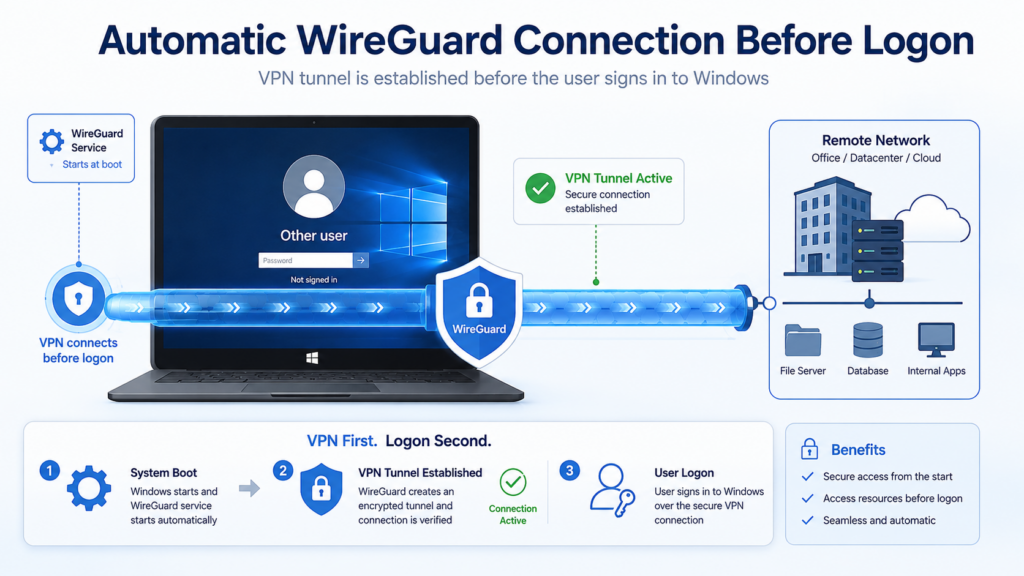
Automatically Enable WireGuard Before Windows Logon
This PowerShell service automatically enables or disables a WireGuard tunnel depending on the computer’s current public IPv4 address.
When the computer is connected to one of the configured trusted networks, the WireGuard tunnel is stopped. When the computer is connected through another network, such as a mobile hotspot, hotel Wi-Fi, or another external Internet connection, the tunnel is started automatically.
Because the script runs as a Windows service under the LocalSystem account, it starts during system boot and does not require a user to log on first. This can be useful for domain-joined computers that need access to Active Directory domain controllers, roaming profiles, network drives, or other internal services before Windows logon.
How it works
The service performs the following steps:
- Determine the computer’s current public IPv4 address.
- Compare the address with a list of trusted WAN IP addresses.
- Stop the WireGuard tunnel when the computer is connected to a trusted network.
- Start the WireGuard tunnel when the computer is connected through any other network.
- Repeat the check at a configurable interval.
The script requires two consecutive matching checks before changing the tunnel state. This small hysteresis helps prevent unnecessary switching when an IP lookup fails temporarily or the network changes.
Requirements
- Windows 10 or Windows 11
- PowerShell 7
- WireGuard for Windows
- NSSM, the Non-Sucking Service Manager
- Administrator privileges for installation
- A working WireGuard configuration file
0. Download and Configure the Script
Save the following PowerShell script as
C:\Program Files\WireGuard-Service\wg-autotoggle.ps1.
Before running it, adjust the trusted WAN addresses, the WireGuard tunnel
name, and the public IP lookup URL in the configuration section.
<#
.SYNOPSIS
    Automatically starts or stops a WireGuard tunnel based on the current
    public IPv4 address.

.DESCRIPTION
    The WireGuard tunnel is stopped when the current public IPv4 address
    belongs to one of the configured trusted networks.

    On any other network, the WireGuard tunnel is started automatically.

    The script is intended to run as a Windows service through NSSM under
    the LocalSystem account.
#>

[CmdletBinding()]
param(
    # Number of seconds between public IP checks.
    [ValidateRange(1, 3600)]
    [int]$CheckIntervalSeconds = 10,

    # Number of consecutive identical decisions required before changing
    # the WireGuard tunnel state.
    [ValidateRange(1, 100)]
    [int]$NeedConsecutive = 2
)

$ErrorActionPreference = "Stop"

# ---------------------------------------------------------------------------
# Configuration
# ---------------------------------------------------------------------------

$TrustedWanIPs = @(
    "0.0.0.0", # Trusted site A
    "0.0.0.0"   # Trusted site B
)

# Must match the WireGuard configuration filename without the .conf extension.
$TunnelName = "MyTunnel"

# Custom endpoint that returns the requesting public IPv4 address as plain text.
$WanIpUrl = "https://www.schrottplatz.biz/wanip.php"

# The script, WireGuard configuration, and log file are stored in this directory.
$ServiceDirectory = $PSScriptRoot
$LogFile = Join-Path $ServiceDirectory "wg-autotoggle.log"

# Public fallback services used when the custom endpoint is unavailable.
$FallbackWanIpUrls = @(
    "https://ipv4.icanhazip.com/",
    "https://ifconfig.co/ip"
)

# ---------------------------------------------------------------------------
# Logging
# ---------------------------------------------------------------------------

function Write-Log {
    param(
        [Parameter(Mandatory)]
        [string]$Message,

        [ValidateSet("INFO", "WARN", "ERROR")]
        [string]$Level = "INFO"
    )

    $timestamp = Get-Date -Format "yyyy-MM-dd HH:mm:ss"
    $logEntry = "$timestamp  [$Level] $Message"

    Add-Content -Path $LogFile -Value $logEntry -Encoding UTF8
}

# ---------------------------------------------------------------------------
# Public IPv4 detection
# ---------------------------------------------------------------------------

function Test-ValidIPv4 {
    param(
        [AllowNull()]
        [AllowEmptyString()]
        [string]$Address
    )

    if ([string]::IsNullOrWhiteSpace($Address)) {
        return $false
    }

    $Address = $Address.Trim()
    $parsedAddress = $null

    if (-not [System.Net.IPAddress]::TryParse(
        $Address,
        [ref]$parsedAddress
    )) {
        return $false
    }

    return $parsedAddress.AddressFamily -eq
        [System.Net.Sockets.AddressFamily]::InterNetwork
}

function Invoke-WanIpRequest {
    param(
        [Parameter(Mandatory)]
        [string]$Url,

        [ValidateRange(1, 60)]
        [int]$TimeoutSeconds = 6
    )

    try {
        $response = Invoke-WebRequest `
            -Uri $Url `
            -Method Get `
            -TimeoutSec $TimeoutSeconds `
            -UserAgent "wg-autotoggle/1.0" `
            -UseBasicParsing

        if ([string]::IsNullOrWhiteSpace($response.Content)) {
            return $null
        }

        # Only evaluate the first line returned by the endpoint.
        $address = (
            $response.Content.Trim() -split "\r?\n" |
                Select-Object -First 1
        ).Trim()

        if (Test-ValidIPv4 -Address $address) {
            return $address
        }

        return $null
    }
    catch {
        return $null
    }
}

function Get-PublicWanIPv4 {
    $lookupUrls = @()

    if (-not [string]::IsNullOrWhiteSpace($WanIpUrl)) {
        $lookupUrls += $WanIpUrl
    }

    $lookupUrls += $FallbackWanIpUrls

    foreach ($url in $lookupUrls) {
        $address = Invoke-WanIpRequest -Url $url

        if ($address) {
            return $address
        }
    }

    return $null
}

# ---------------------------------------------------------------------------
# WireGuard tunnel service management
# ---------------------------------------------------------------------------

function Get-TunnelServiceName {
    param(
        [Parameter(Mandatory)]
        [string]$Name
    )

    return "WireGuardTunnel`$$Name"
}

function Install-TunnelService {
    $serviceName = Get-TunnelServiceName -Name $TunnelName

    if (Get-Service -Name $serviceName -ErrorAction SilentlyContinue) {
        return
    }

    $wireGuardExecutable = Join-Path `
        $env:ProgramFiles `
        "WireGuard\wireguard.exe"

    if (-not (Test-Path -LiteralPath $wireGuardExecutable)) {
        throw "WireGuard executable not found: $wireGuardExecutable"
    }

    $configurationFile = Join-Path `
        $ServiceDirectory `
        "$TunnelName.conf"

    if (-not (Test-Path -LiteralPath $configurationFile)) {
        throw "WireGuard configuration file not found: $configurationFile"
    }

    Write-Log "Installing WireGuard tunnel service '$TunnelName'."

    & $wireGuardExecutable /installtunnelservice $configurationFile

    if ($LASTEXITCODE -ne 0) {
        throw (
            "WireGuard tunnel service installation failed with exit code " +
            "$LASTEXITCODE."
        )
    }

    Start-Sleep -Seconds 1

    if (-not (Get-Service -Name $serviceName -ErrorAction SilentlyContinue)) {
        throw "WireGuard tunnel service '$serviceName' was not created."
    }
}

function Set-TunnelState {
    param(
        [Parameter(Mandatory)]
        [bool]$ShouldBeUp
    )

    $serviceName = Get-TunnelServiceName -Name $TunnelName
    $service = Get-Service -Name $serviceName -ErrorAction SilentlyContinue

    if (-not $service) {
        Install-TunnelService
        $service = Get-Service -Name $serviceName -ErrorAction Stop
    }

    if ($ShouldBeUp) {
        if ($service.Status -ne [System.ServiceProcess.ServiceControllerStatus]::Running) {
            Write-Log "Starting WireGuard tunnel '$TunnelName'."
            Start-Service -Name $serviceName
        }

        return
    }

    if ($service.Status -ne [System.ServiceProcess.ServiceControllerStatus]::Stopped) {
        Write-Log "Stopping WireGuard tunnel '$TunnelName'."
        Stop-Service -Name $serviceName
    }
}

# ---------------------------------------------------------------------------
# Main loop
# ---------------------------------------------------------------------------

Write-Log (
    "Service started. Trusted WAN IPs: " +
    "$($TrustedWanIPs -join ', ') | " +
    "Tunnel: $TunnelName | " +
    "Check interval: $CheckIntervalSeconds seconds | " +
    "Required consecutive checks: $NeedConsecutive"
)

[int]$AgreementCount = 0
[Nullable[bool]]$LastDecision = $null

while ($true) {
    try {
        $publicIPv4 = Get-PublicWanIPv4

        if (-not $publicIPv4) {
            Write-Log `
                -Level "WARN" `
                -Message "The public IPv4 address could not be determined. No action was taken."

            $AgreementCount = 0
            $LastDecision = $null
        }
        else {
            $isTrustedNetwork = $TrustedWanIPs -contains $publicIPv4

            # The tunnel should be active whenever the current network is not trusted.
            $shouldTunnelBeUp = -not $isTrustedNetwork

            if (
                $null -eq $LastDecision -or
                $LastDecision -ne $shouldTunnelBeUp
            ) {
                $AgreementCount = 1
                $LastDecision = $shouldTunnelBeUp
            }
            else {
                $AgreementCount++
            }

            Write-Log (
                "IP=$publicIPv4 | " +
                "trusted=$isTrustedNetwork | " +
                "desiredUp=$shouldTunnelBeUp | " +
                "agreement=$AgreementCount/$NeedConsecutive"
            )

            if ($AgreementCount -ge $NeedConsecutive) {
                Set-TunnelState -ShouldBeUp $shouldTunnelBeUp

                # Start a new decision cycle after checking the desired state.
                $AgreementCount = 0
                $LastDecision = $null
            }
        }
    }
    catch {
        Write-Log `
            -Level "ERROR" `
            -Message $_.Exception.Message
    }

    Start-Sleep -Seconds $CheckIntervalSeconds
}
Replace the example addresses and tunnel name with values matching your own environment. The WAN IP lookup endpoint shown above is operated by schrottplatz.biz and returns the requesting public IPv4 address as plain text.
1. Install PowerShell 7, WireGuard, and NSSM
The required applications can be installed from an elevated PowerShell terminal using WinGet:
winget install --exact --id Microsoft.PowerShell winget install --exact --id WireGuard.WireGuard winget install --exact --id NSSM.NSSMAfter installation, verify that PowerShell 7 and NSSM are available:
pwsh.exe --version nssm versionDepending on the NSSM installation method, its executable may also be available through:
C:\Program Files\WinGet\Links\nssm.exe2. Create the service directory
Create a directory for the script, WireGuard configuration, and log files:
New-Item -ItemType Directory ` -Path "C:\Program Files\WireGuard-Service" ` -ForceCopy the PowerShell script to:
C:\Program Files\WireGuard-Service\wg-autotoggle.ps1Optionally, place the WireGuard configuration in the same directory:
C:\Program Files\WireGuard-Service\MyTunnel.conf The name of the configuration file without the .conf extension becomes the WireGuard tunnel name.
3. Configure the PowerShell script
Open wg-autotoggle.ps1 with a text editor and adjust the configuration section:
$TrustedWANIPs = @( "203.0.113.10", # Trusted location A "198.51.100.20" # Trusted location B ) $TunnelName = "MyTunnel" $LogFile = "C:\Program Files\WireGuard-Service\wg-autotoggle.log" $WanIpUrl = "https://example.com/wanip.php"Trusted WAN IP addresses
Add the public IPv4 addresses of networks where the VPN is not required. These would normally be the fixed public WAN addresses of the locations that already have direct access to the internal network.
Do not enter private addresses such as 192.168.x.x, 10.x.x.x, or 172.16.x.x. The script compares the public address visible on the Internet.
Tunnel name
The value of $TunnelName must match the name of the WireGuard configuration file without its extension.
For example:
Configuration file: MyTunnel.conf Tunnel name: MyTunnel Windows service: WireGuardTunnel$MyTunnelPublic IP lookup
The script first tries to retrieve the public IPv4 address from the URL configured in $WanIpUrl. The endpoint must return only the client’s IPv4 address as plain text.
A minimal PHP endpoint can look like this:
<?php header('Content-Type: text/plain; charset=utf-8'); echo $_SERVER['REMOTE_ADDR']; If the custom endpoint is unavailable, the script uses public fallback services.
4. Test the script interactively
Before installing the Windows service, start the script manually from an elevated PowerShell terminal:
& "C:\Program Files\PowerShell\7\pwsh.exe" ` -NoProfile ` -ExecutionPolicy Bypass ` -File "C:\Program Files\WireGuard-Service\wg-autotoggle.ps1"Let it run through several checks and inspect the log:
Get-Content ` "C:\Program Files\WireGuard-Service\wg-autotoggle.log" ` -WaitA typical log entry looks like this:
2026-07-19 08:30:01 IP=203.0.113.10 | trusted=True | desiredUp=False | agreeCount=1/2 2026-07-19 08:30:11 IP=203.0.113.10 | trusted=True | desiredUp=False | agreeCount=2/2 2026-07-19 08:30:11 Stopping WireGuard tunnel 'MyTunnel'... Stop the interactive test with Ctrl+C before installing the service.
5. Install the NSSM service
Run the following commands from an elevated PowerShell terminal:
nssm install wg-autotoggle pwsh.exe nssm set wg-autotoggle AppParameters ` '-NoProfile -ExecutionPolicy Bypass -File "C:\Program Files\WireGuard-Service\wg-autotoggle.ps1"' nssm set wg-autotoggle AppDirectory ` "C:\Program Files\WireGuard-Service" nssm set wg-autotoggle AppExit Default Restart nssm set wg-autotoggle AppRestartDelay 1500 nssm set wg-autotoggle AppStdout ` "C:\Program Files\WireGuard-Service\wg-autotoggle-service.log" nssm set wg-autotoggle AppStderr ` "C:\Program Files\WireGuard-Service\wg-autotoggle-service.log" nssm set wg-autotoggle DisplayName ` "WireGuard Auto-Toggle" nssm set wg-autotoggle Description ` "Automatically starts WireGuard outside trusted networks and stops it on trusted networks." nssm set wg-autotoggle ObjectName LocalSystem nssm set wg-autotoggle Start SERVICE_AUTO_START nssm set wg-autotoggle Type SERVICE_WIN32_OWN_PROCESSThe commands above are the readable equivalent of the heavily escaped output produced by:
nssm dump wg-autotoggle The output of nssm dump is intended for use in a command script and therefore contains additional quoting and escape characters. It should not normally be copied line by line into PowerShell.
6. Start and verify the service
Start the service:
Start-Service wg-autotoggleCheck its state:
Get-Service wg-autotoggleDisplay the complete NSSM configuration:
nssm dump wg-autotoggleFollow the script log in real time:
Get-Content ` "C:\Program Files\WireGuard-Service\wg-autotoggle.log" ` -WaitFollow the redirected PowerShell output:
Get-Content ` "C:\Program Files\WireGuard-Service\wg-autotoggle-service.log" ` -Wait7. Verify the WireGuard tunnel service
WireGuard for Windows creates a separate Windows service for each tunnel. Its service name follows this format:
WireGuardTunnel$TunnelNameFor a tunnel named MyTunnel, check it with:
Get-Service 'WireGuardTunnel$MyTunnel'The single quotes are important in PowerShell because the service name contains a dollar sign.
You can list all installed WireGuard tunnel services with:
Get-Service 'WireGuardTunnel$*'8. Test the automatic switching
The most useful test is to switch between two different Internet connections:
- Connect the computer to a trusted home or office network.
- Confirm that the detected WAN IP is listed in
$TrustedWANIPs. - Verify that the WireGuard tunnel service is stopped.
- Disconnect from that network and connect through a mobile hotspot.
- Wait for two successful checks.
- Verify that the WireGuard tunnel service starts.
Check both services:
Get-Service wg-autotoggle, 'WireGuardTunnel$MyTunnel'9. Changing the check interval
By default, the script checks the public address every ten seconds and requires two identical decisions:
param( [int]$CheckIntervalSeconds = 10, [int]$NeedConsecutive = 2 )The values can also be supplied through the NSSM service parameters:
nssm set wg-autotoggle AppParameters ` '-NoProfile -ExecutionPolicy Bypass -File "C:\Program Files\WireGuard-Service\wg-autotoggle.ps1" -CheckIntervalSeconds 15 -NeedConsecutive 3'Restart the service after changing its configuration:
Restart-Service wg-autotoggle10. Updating the script
Stop the service before replacing the PowerShell file:
Stop-Service wg-autotoggleReplace or edit:
C:\Program Files\WireGuard-Service\wg-autotoggle.ps1Then start the service again:
Start-Service wg-autotoggle11. Removing the service
Stop and remove the NSSM service:
Stop-Service wg-autotoggle -ErrorAction SilentlyContinue nssm remove wg-autotoggle confirmThis removes only the auto-toggle service. It does not uninstall WireGuard or delete the WireGuard tunnel configuration.
To remove the WireGuard tunnel service separately, use:
& "$env:ProgramFiles\WireGuard\wireguard.exe" ` /uninstalltunnelservice MyTunnelSecurity considerations
- The service runs as
LocalSystembecause starting and stopping Windows services requires elevated privileges. - Only administrators should be allowed to modify the service directory and the PowerShell script.
- Do not place WireGuard private keys in a publicly accessible directory.
- Use HTTPS for the custom WAN IP endpoint.
- The WAN IP endpoint should return only the requesting address and should not expose unnecessary diagnostic information.
- A public IP address identifies a network connection, not a specific computer. It should therefore only be used to decide whether the VPN is required, not as an authentication mechanism.
Important limitation
This solution assumes that each trusted location has a stable public IPv4 address. If the Internet provider changes the address regularly, the trusted address list must be updated or replaced with another method of identifying the current network.
The script deliberately takes no action when the public IPv4 address cannot be determined. This avoids disabling the VPN merely because an IP lookup service is temporarily unavailable.